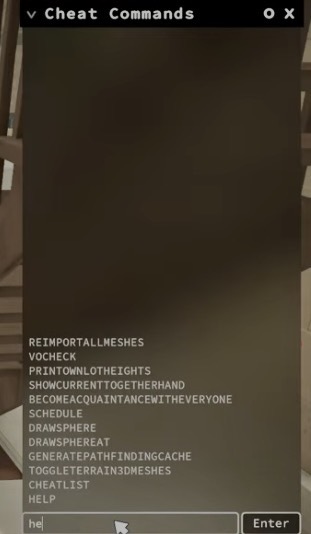
If you’re looking to use cheats in Paralives, the first thing you’ll need to know is how to access the cheat console.The cheat console gives players access to money cheats, character cheats, skill cheats, build mode commands, and many other tools.
Opening the Cheat Console
While playing Paralives, press:
Ctrl + F1
This opens the cheat console on the right side of the screen. From there, you can enter cheat commands to modify money, skills, needs, relationships, careers, and much more.
Viewing Available Cheats
To see a list of available commands, type:
help
and press Enter.
The console will display a list of supported cheat commands and debugging tools currently available in the game.
Popular Beginner Cheats
Give Money
printmoney 5000
Adds 5,000 Paradimes to your household.
Set Household Funds
setmoney 500000
Sets your household balance to 500,000 Paradimes.
Instant Bonus Money
jackpot
Adds 50,000 Paradimes instantly.
Fill All Needs
reliefallneeds
Refills all needs for the selected Para.
Edit Your Character
editcharacter
Opens Paramaker for the currently selected Para.
Troubleshooting
If the cheat console does not appear:
- Make sure Paralives is running and in focus.
- Press Ctrl and F1 at the same time.
- Check that your keyboard shortcuts are functioning correctly.
- Try reopening the game if the console fails to appear.
Final Thoughts
The cheat console is the gateway to every cheat and console command available in Paralives. Once opened, you can use commands to gain money, manage needs, adjust skills, edit characters, and experiment with the game’s systems.
For a complete list of available commands, visit our All Cheats page.
Leave a Reply